Build on CodePay.
CodePay is an open platform. It lets developers build apps and connect external POS systems to CodePay terminals.
POST /api/entry/wisehubcloudpayorder

{
  "app_id": "your app id",
  "merchant_no": "your merchant no",
  "biz_data": {
    "merchant_order_no": "your merchant order no",
    "order_amount": "10",
    "price_currency": "USD",
    "device_sn": "your terminal sn",
    "trans_type": "1"
  }
}

// 200 · trans_status 9 — pushed, awaiting payment
// terminal wakes CodePay Register, guides the payment
For example, on the CodePay platform, you can:
- Build Android apps for CodePay terminals using the Android SDK. Your apps can use business data and terminal hardware features.
- Use the REST API to process payments from your POS on different devices (like Windows or iOS), without worrying about the terminal type.
- Connect your POS to CodePay devices and accept PCI-compliant card payments by dip, swipe, or tap.
Choose your integration path
CodePay provides two types of integration solutions.
On-CodePay Terminal
You want your android POS app on CodePay terminal.
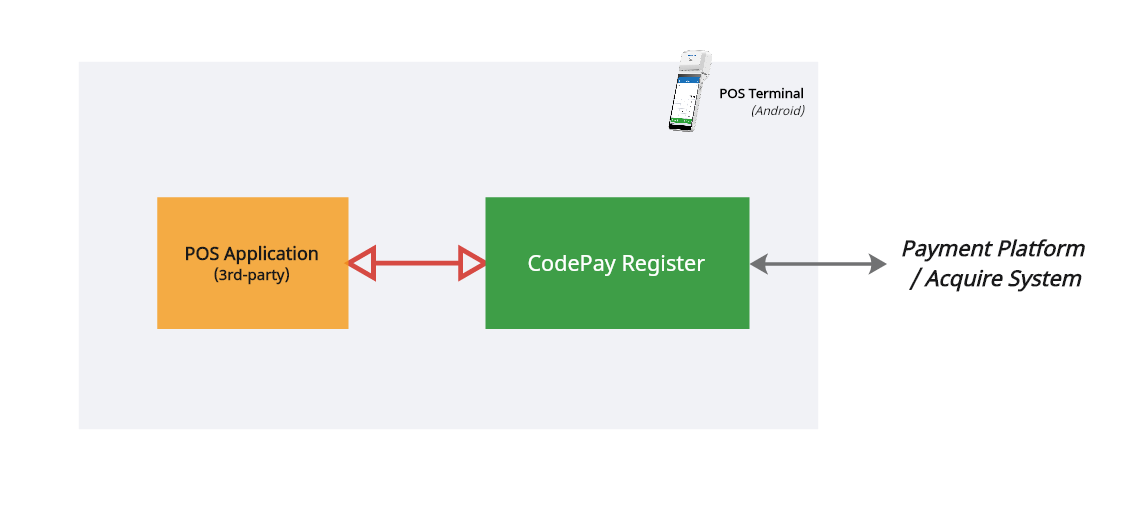
- Intent-based payment APIs for your android POS running on CodePay terminal to process payments.
External POS
You want CodePay terminal to process payments from your external POS or hardware.
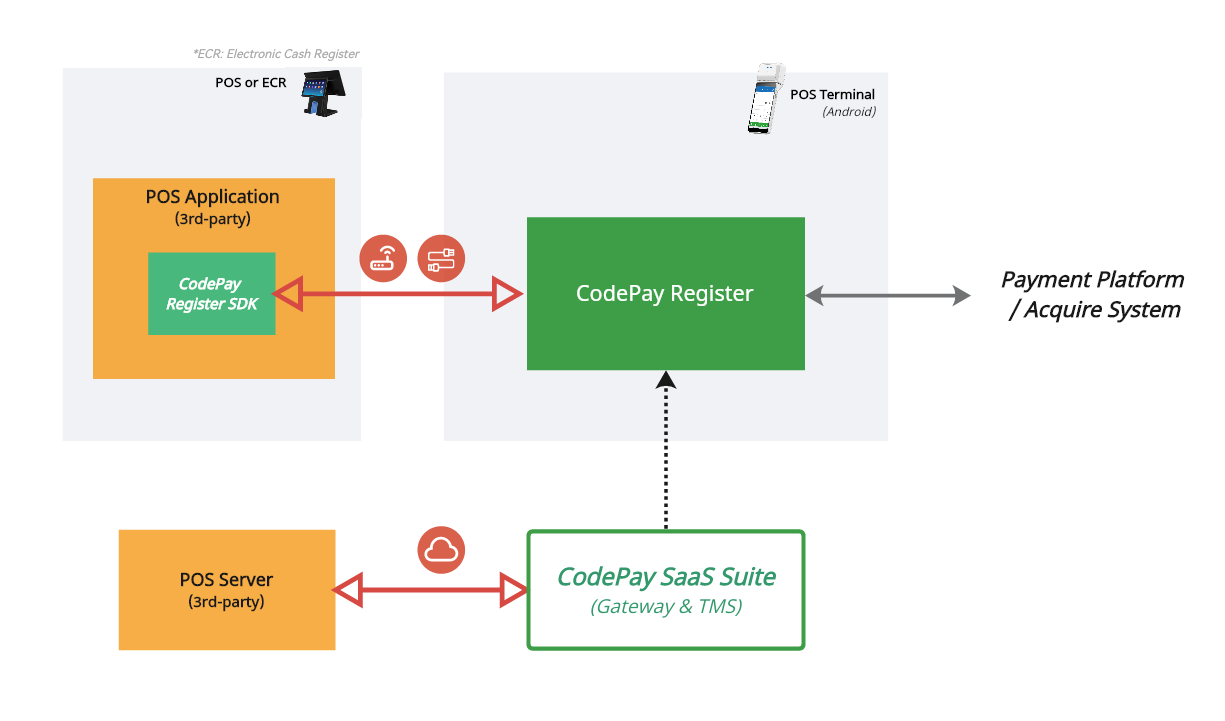
- In the cloud — provides an interface that lets you use your web-based POS to interact with CodePay terminal through the cloud.
- In WLAN — allows communication and interaction with a CodePay terminal using WebSocket over the local network IP.
Get started
Get PayPilot account
Ask your company's admin to apply for a login account for you. If your company's admin also doesn't have an account, please contact our sales team.
Create, install, and test your apps
Create test merchant accounts to manage merchant information, then create your Payment App ID so CodePay can check and verify your POS app.
Select your integration type
Your POS app runs directly on the CodePay terminal — On-CodePay Terminal Integration. Or it runs on external hardware such as Windows, iOS, or an Android tablet — External POS Integration.
Test based payment flow
Use the test card for the test scenarios, and make sure your application processes each payment flow as expected.
Reference and tools
Everything you will reach for while integrating.
⚙️ Cloud Open API
Push orders, query, close and refund — the full REST reference.
🧭 Response & status codes
Every response code and transaction status, and what your app should do next.
🔐 API security
RSA signing, encryption, and what to stop using.
💳 Test card numbers
UAT PANs for approvals, declines, timeouts and more.
✨ Build with AI
Point your coding agent at CodePay's machine-readable docs.